
How to find AI tools that actually fit your workflow
A practical framework for discovering, comparing, testing, and adopting AI software without wasting time on tool overload.
| Discover → Evaluate → ImplementUse directories to understand the market, comparisons to reduce uncertainty, and workflows to turn AI into measurable outcomes. |
Contents
01 Why AI tool discovery has become difficult
02 What makes a useful AI tools directory
03 A practical framework for choosing an AI tool
04 The seven questions to ask before paying
05 Free and open-source AI tools
06 How needs differ by user type
07 Red flags when evaluating directories
08 The AI directory is becoming a resource layer
09 A better process for finding AI tools
10 Frequently asked questions
11 Final thoughts
| Editorial noteAI products, pricing, model availability and usage policies can change quickly. Use directories and reviews for discovery, then verify critical purchasing and security details with the vendor before production deployment. |
Finding an AI tool is easy. Finding the right one is not.
The AI market now spans general-purpose assistants, coding agents, image and video generators, research platforms, sales automation software, AI search engines, workflow automation systems, model integrations, MCP servers, custom agents, prompt libraries, and thousands of highly specialized applications.
The problem is no longer a shortage of options. It is discovery, comparison, verification, and fit.
Search for an AI marketing tool, coding assistant, or research platform and you can quickly encounter dozens of products making similar promises. A well-structured AI Tool Directory can reduce that noise by helping you search the market by category, pricing, popularity, and use case rather than relying on a random list of vendor homepages.
A useful directory should move you from “there are thousands of AI tools” to “these three products actually fit the job I need to do.” This guide explains how to make that transition deliberately.
What is an AI tools directory?
An AI tools directory is a structured discovery layer for artificial-intelligence software and related resources. Traditional software directories tend to organize products into broad categories such as CRM, accounting, or project management. AI is more complicated because a single product can simultaneously be a writing assistant, coding tool, research system, automation layer, data-analysis interface, and gateway to third-party services.
That is why modern discovery increasingly extends beyond standalone applications. The Neura Market directory hub organizes resources across major AI ecosystems, including platform-specific directories for ChatGPT, Claude, Gemini, Cursor, Perplexity, and other systems, as well as prompts, agents, rules, MCP servers, and integrations.
1. Why AI tool discovery has become difficult
Too many products sound the same
AI product descriptions frequently repeat the same claims: increase productivity, automate your workflow, create content faster, or transform your business. Those statements rarely tell you whether the product solves your specific problem better than an existing tool.
Useful discovery therefore depends on structured categories, filters, comparable descriptions, and clear distinctions between capabilities—not the volume of marketing copy.
The products change quickly
Models, prices, free tiers, integrations, limits, and product positioning can change in months or even weeks. A directory that is useful for AI needs to be maintained with greater frequency than many traditional software catalogs.
“Best” depends on the job
A solo creator, enterprise security team, developer, ecommerce operator, and research analyst may evaluate the same product differently. The better question is not “What is the best AI tool?” but “What is the best AI tool for this task, these constraints, and this workflow?”
| Key idea Evaluate fit against a defined job. Popularity is a signal; it is not a substitute for requirements. |
2. What makes a useful AI tools directory?
Search that starts with the problem
Users often know what they want to accomplish before they know the software category. Someone looking for “AI that reads support tickets and drafts replies” may not know whether to search customer support, AI agents, workflow automation, conversational AI, or business automation.
A broad discovery surface such as Neura Market’s AI Tool Directory is most useful when it lets the user move from a task or category toward realistic candidates rather than forcing them to begin with a vendor name.
Useful filters and categories
As a directory grows, filters become essential. The most useful dimensions include category, use case, pricing model, free-plan availability, open-source status, platform, popularity, integration options, and recency.
If you are still exploring without a budget, Neura also maintains a collection of free AI tools and utilities that can help with early experimentation before you commit to additional subscriptions.
Descriptions that answer practical questions
- What does the tool actually do?
- Who is it designed for?
- How is it priced?
- Is a free plan or trial available?
- Which platforms or data sources does it integrate with?
- What makes it meaningfully different from alternatives?
- What obvious limitations should a buyer test?
A directory should reduce research effort. A name, logo, and tagline are not enough.
Platform-specific discovery
AI ecosystems are increasingly platform-specific. Someone building around ChatGPT may need custom GPTs, prompts, agents, or integrations; a Claude user may be looking for MCP servers, rules, or automation resources in the Claude directory; and a developer working in Cursor may value rules, configurations, and coding resources in the Cursor directory more than another general-purpose AI application.
Sometimes the right answer is not another SaaS subscription. It is a better prompt, agent, integration, rule file, or workflow for a platform you already use.
A path from discovery to implementation
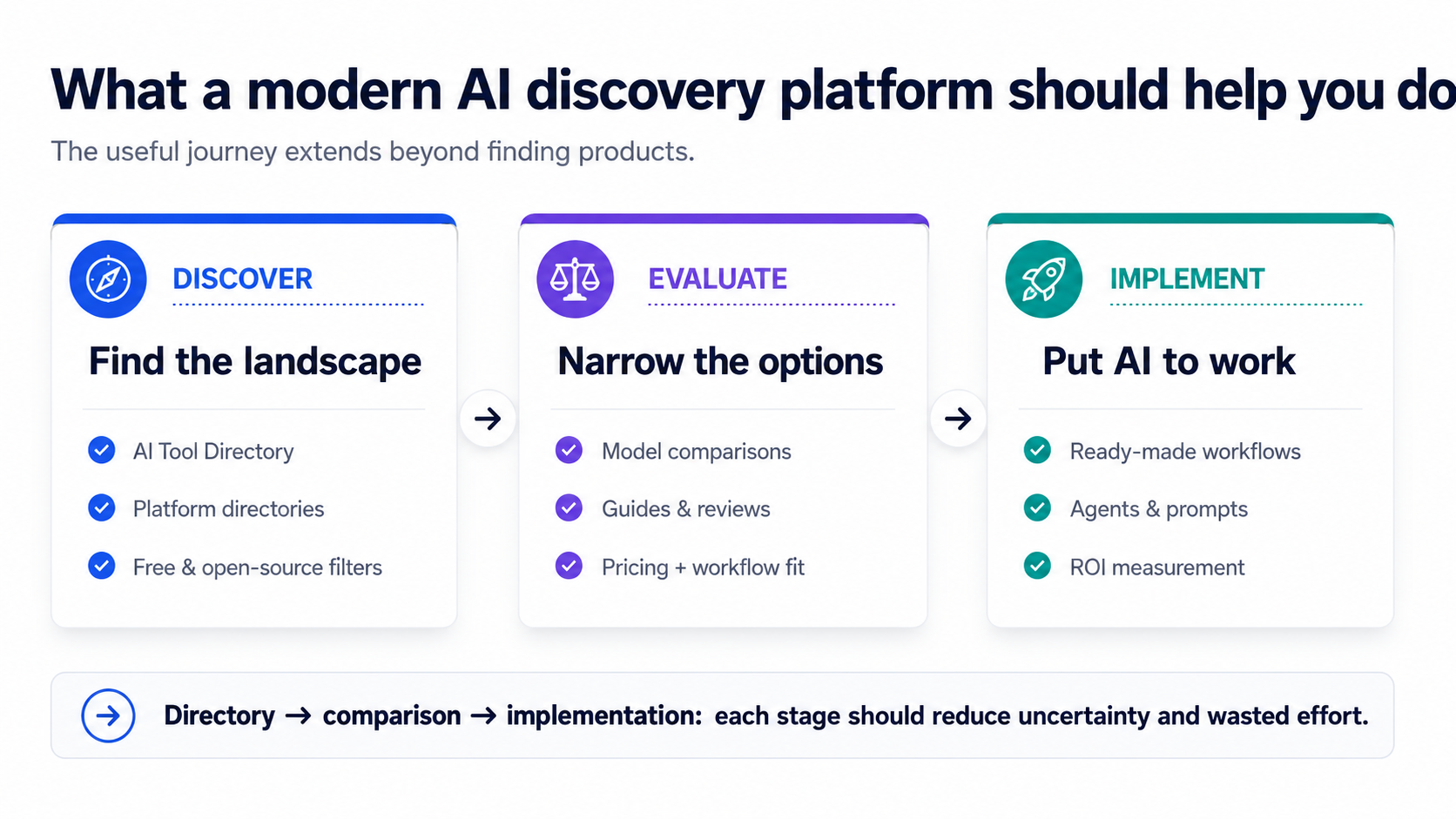
Finding software is only the first step. Neura’s AI automation marketplace and workflow marketplace address the implementation layer by helping users browse prompts, agents, and ready-to-import automations rather than starting every workflow from a blank canvas.
For teams deciding whether automation is economically worthwhile, an automation ROI calculator can help frame savings against implementation and operating costs.
3. A practical framework for choosing an AI tool
Step 1: Define the job before choosing the software
Start with one sentence: “I need an AI system that can ______.” Make the outcome concrete enough to test.
- I need an AI system that can classify incoming support emails and draft responses for human approval.
- I need an AI system that can turn long-form video into short social clips.
- I need an AI system that can inspect a codebase and help implement multi-file changes.
- I need an AI system that can research companies and populate structured CRM fields.
Do not buy AI because it is impressive. Buy software because it solves a recurring problem with measurable value.
Step 2: Write down non-negotiable requirements
| Requirement | Example constraint |
|---|---|
| Budget | Under $50/month |
| Integration | Must connect to HubSpot |
| Input | Must support PDF uploads |
| Output | Structured CSV required |
| Team | At least five users |
| Security | Sensitive business data needs documented controls |
| API | Required |
| Automation | Webhooks or native automation support |
Step 3: Shortlist three to five candidates
Do not compare forty products at once. Use a directory to narrow the market to a small set that already meets your minimum requirements.
Step 4: Give every tool the same test
Use identical inputs and success criteria. For an AI writer, use the same brief. For an image generator, use the same prompt and reference material. For a coding agent, use the same repository task. For a research product, ask the same research question.
- Output quality
- Completion time
- Manual corrections required
- Consistency
- Ease of use
- Failure handling
- Total cost per useful result
When comparing frontier models rather than complete applications, a structured AI model comparison tool can provide a starting framework, but your own task-specific benchmark should still decide the winner.
4. The seven questions to ask before paying
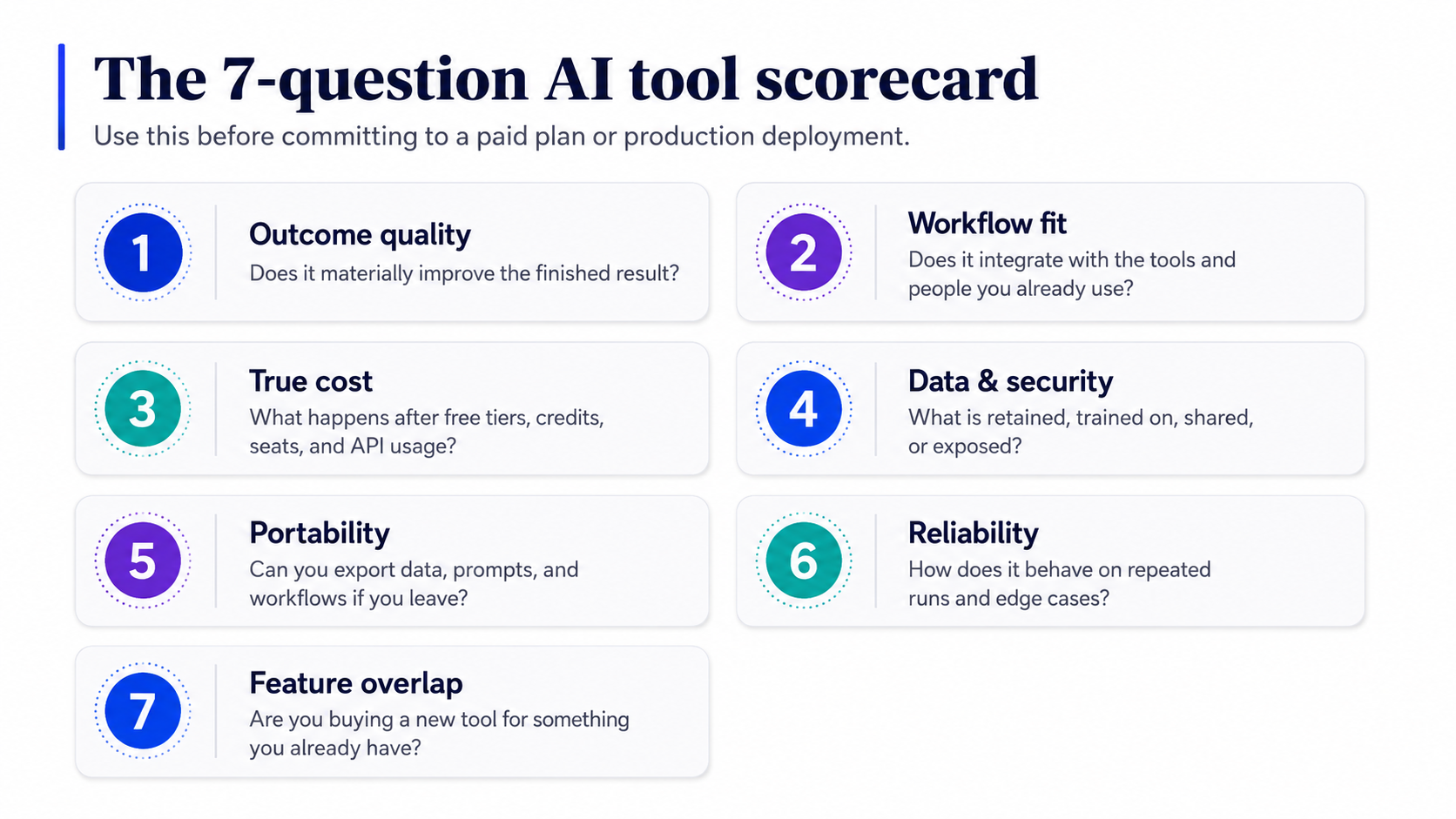
1. Does it produce a better outcome?
Saving five minutes is irrelevant if a person needs fifteen minutes to repair the result. Evaluate the finished work, not only generation speed.
2. Does it fit the existing workflow?
A slightly weaker model with excellent integrations can create more value than a technically stronger system that requires constant copying, pasting, and manual reconciliation.
3. What does it really cost?
Include usage limits, token charges, API fees, credits, seats, storage, premium models, automation runs, and overages—not just the headline plan price.
4. What happens to your data?
Before uploading customer data, contracts, source code, financial material, or proprietary information, review current privacy, retention, security, and model-training policies.
5. Can you leave?
Check export options, workflow portability, APIs, file ownership, and proprietary formats before a tool becomes deeply embedded in operations.
6. Is it reliable enough?
Test repeated runs, long inputs, unusual cases, rate limits, and failure handling. Production workflows need exception handling, not just a successful demo.
7. Are you paying for a tool—or a feature?
Your CRM, office suite, design application, project system, coding environment, or automation platform may already provide an adequate version of the capability.
| Security note For higher-stakes adoption, use a formal risk process. NIST’s AI Risk Management Framework is a useful external reference for thinking about trustworthy AI governance, measurement, and risk controls. |
NIST AI Risk Management Framework
5. Free and open-source AI tools: what “free” really means
The word “free” can describe several very different pricing models. Understanding the distinction prevents surprise costs later.
| Model | What it usually means |
|---|---|
| Completely free | No payment required for the core service. |
| Freemium | A basic tier is free; advanced features require payment. |
| Free trial | The product is temporarily available without payment. |
| Credit-based | Users receive a limited number of generations, tokens, or runs. |
| Open source | The software can be inspected or self-hosted, although infrastructure may still cost money. |
| Free interface + paid API | The front end may be free while model or API usage is billed separately. |
For experimentation, Neura’s free AI tools collection can be a practical starting point. For production use, evaluate what the service costs after your usage grows—not only what it costs on day one.
6. Different users need different discovery paths
Marketing teams
Marketing teams may need content generation, SEO, social media, advertising, research, email, personalization, analytics, lead generation, and creative production. Rather than assuming one chatbot should do everything, compare specialist applications with general-purpose systems.
For a narrower starting point, Neura’s 2026 AI marketing tools comparison evaluates a focused set of marketing platforms and explains the criteria used in that comparison.
Developers
AI coding now includes completion, repository-aware agents, review, testing, debugging, terminal agents, documentation, MCP servers, rules, and autonomous development workflows. Platform-specific discovery is often more useful than a generic list of coding products.
Developers can browse Neura’s Cursor directory or Claude directory when the need is configuration- or ecosystem-specific rather than simply “find an AI coding tool.”
Operations teams
Operations teams should evaluate AI at the workflow level: trigger, context retrieval, model step, validation, action, exception handling, and human review. The most valuable asset may be the orchestration pattern rather than any single model.
Neura’s guide to AI agent workflows provides a deeper introduction to orchestrated agent workflows, while the workflow marketplace offers deployable examples across automation platforms.
Researchers and analysts
Useful capabilities can include web research, source citations, PDF analysis, literature review, data extraction, spreadsheet analysis, summarization, and structured reporting. For research use cases, source quality and reproducibility matter as much as fluency.
Creators and designers
Creative AI discovery spans image generation, image editing, video, voice, music, avatars, presentations, 3D generation, and animation. If the output will be used commercially, evaluate licensing, usage rights, privacy, and vendor terms before adopting a tool into paid production.
7. Red flags when evaluating an AI tools directory
Rankings with no methodology
A “#1” label is not meaningful unless the basis for ranking is explained.
Old information presented as current
Check dates and verify pricing, model support, and product availability.
Thousands of near-duplicate listings
Coverage is useful only if organization and filtering remain usable.
No pricing context
A $20/month self-serve tool and an enterprise platform should not be treated as interchangeable.
Marketing copy instead of evaluation
Descriptions should explain functions, users, trade-offs, and limitations.
No distinction between tools, models, agents, and workflows
These are different layers of the AI stack and should be represented separately.
8. The AI directory is becoming a resource layer
The original AI directory answered a simple question: “What AI applications exist?” The more useful question in 2026 is broader: “What combination of tools, models, agents, prompts, rules, integrations, and workflows will solve this problem?”
This is why Neura Market positions itself as a broader resource hub and marketplace for AI rather than only a list of software products. Its directory hub spans multiple platform ecosystems, while the marketplace focuses on resources that can be used or deployed.
The future AI directory is less like a phone book of software companies and more like a search layer for the AI ecosystem.
9. A better process for finding AI tools
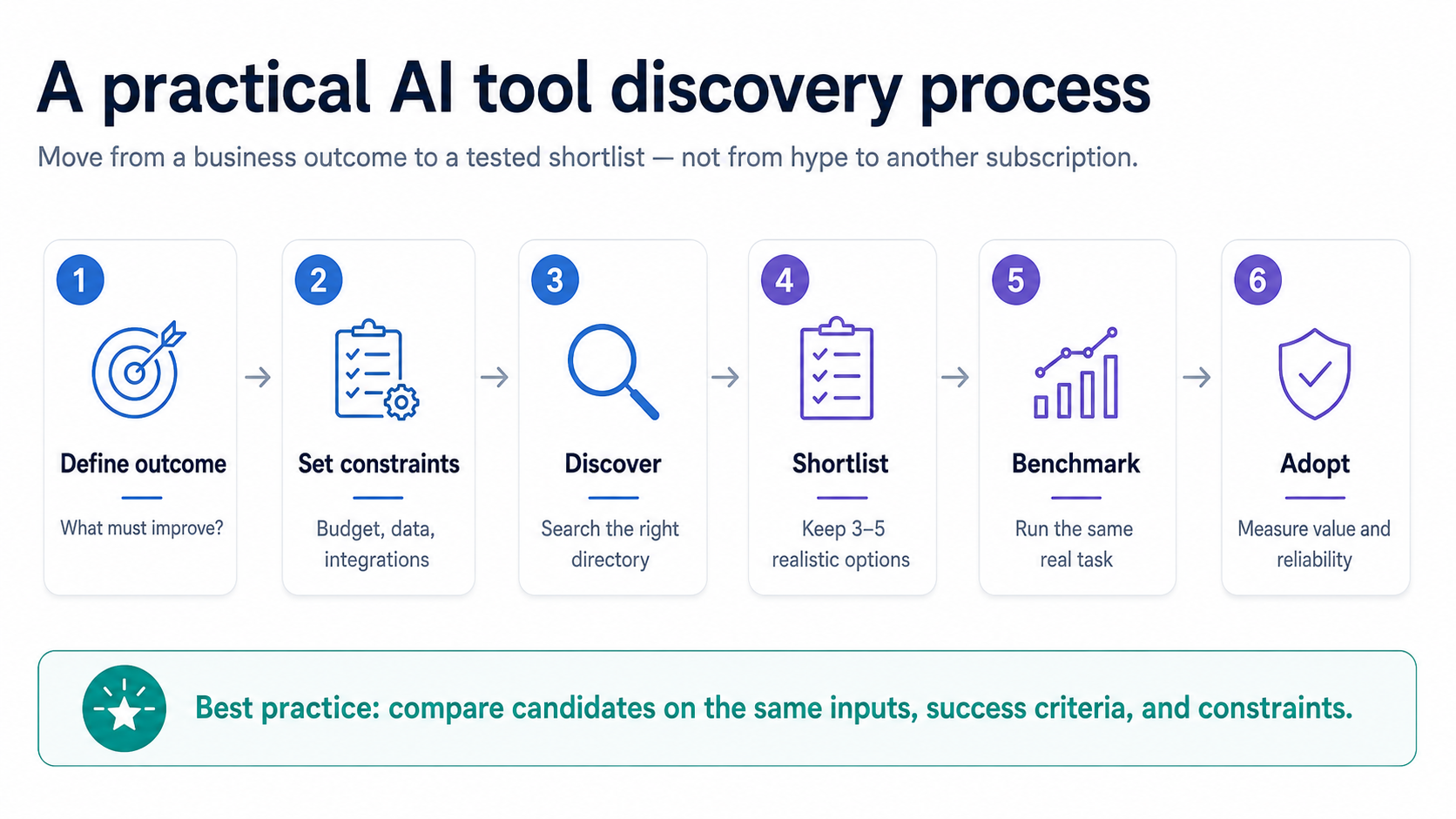
- Define the outcome you want to improve or automate.
- Write down your constraints: budget, platform, integrations, security, team size, and required functionality.
- Use a broad directory to understand the market and find candidates.
- Move into a platform-specific directory when the need is ecosystem-specific.
- Create a shortlist of three to five realistic products.
- Test the same real-world task across every candidate.
- Evaluate the entire workflow, including integration, human review, and failure handling.
- Check privacy, security, retention, and governance requirements.
- Calculate total cost rather than headline subscription price.
- Adopt only after a small pilot demonstrates the outcome you need.
A practical starting sequence is: browse the AI Tool Directory, explore the platform directories if your need is ecosystem-specific, compare models or economics with Neura’s free tools, and then inspect workflows and deployable resources when you are ready to implement.
10. Frequently asked questions
What is the best AI tools directory?
There is no single directory that is best for every user. The strongest directories combine broad coverage with useful categorization, current information, filtering, pricing context, and enough detail to build a realistic shortlist.
What is an AI tools directory used for?
It helps users discover and compare AI software by category, use case, price, platform, and functionality. More advanced directories may also organize agents, prompts, rules, integrations, MCP servers, workflows, jobs, and learning resources.
Where can I find new AI tools?
A directory consolidates products that would otherwise be discovered across search engines, launch platforms, social feeds, repositories, newsletters, and vendor websites. Use the directory for discovery and verify important buying details with the vendor.
Are AI tools directories free?
Many directories are free to browse. The products they list may be free, freemium, open source, usage-based, subscription-based, or enterprise software.
How do I find the right AI tool for my business?
Define the process you want to improve, list requirements and constraints, discover candidates, shortlist a few, and test them on the same real-world task before purchasing.
How often should directory information be updated?
As frequently as practical. AI features and pricing change quickly, so purchasing and security details should be checked against the vendor’s current documentation.
Can I trust AI tool ratings?
Use ratings as one signal. Your own workflow, quality requirements, integrations, and risk constraints matter more than an aggregate score.
What is the difference between an AI directory and an AI marketplace?
A directory is primarily for discovery and research. A marketplace is oriented toward obtaining or purchasing resources such as workflows, prompts, agents, or templates.
Should I use several AI tools or one platform?
Use as few as necessary. Every additional tool adds cost, training requirements, data-handling considerations, and operational complexity.
11. Final thoughts
The AI industry does not have a discovery problem because information is scarce. It has a discovery problem because information is abundant and meaningful differentiation is difficult.
The best AI tools directory should therefore do more than show what exists. It should help you understand the market, narrow realistic alternatives, compare them against your constraints, and move from experimentation toward implementation.
Most importantly, do not judge an AI directory solely by how many listings it contains, and do not judge an AI product solely by how impressive its demo appears. Start with the outcome, define the constraints, test realistic options, and choose the smallest reliable AI stack that produces the result you need.
Start with Neura Market, browse the AI Tool Directory, or explore all AI platform directories to find tools and resources for the ecosystem you already use.
Useful Neura Market resources referenced in this guide
| Resource | Best used for |
|---|---|
| Neura Market home | AI resource hub, workflows, directories, marketplace, and business automation services. |
| AI Tool Directory | Search and compare the broader AI software market. |
| AI Directories | Explore resources by major AI platform ecosystem. |
| ChatGPT Directory | GPTs, prompts, agents, integrations, and related resources. |
| Claude Directory | Claude-focused prompts, rules, agents, MCP resources, and more. |
| Cursor Directory | Cursor rules, prompts, agents, integrations, and coding resources. |
| AI Automation Marketplace | Prompts, agents, workflows, and deployable automation resources. |
| Workflow Marketplace | Browse automation workflows for leading automation platforms. |
| Free AI Tools | Interactive AI utilities, comparisons, calculators, and generators. |
| Neura Market Blog | AI guides, comparisons, tutorials, and automation insights. |